/Amazon Seller Central: The Complete Guide for Sellers in 2026

Amazon Seller Central: The Complete Guide for Sellers in 2026

Your Amazon Seller Central Guide for 2026
Amazon Seller Central is the command center for every seller on Amazon. It controls your inventory, pricing, orders, advertising, reports, and account health. If you're selling on Amazon and not using Seller Central effectively, you're leaving money on the table.
This amazon seller central guide covers everything from setting up your seller central account to running advanced analytics most sellers never touch. Whether you're a new seller figuring out the basics or an experienced seller looking for tools you've missed, this is the resource you'll keep coming back to.
We'll walk through the Amazon Seller Central dashboard, account setup, inventory management, fulfillment options, advertising, reports, and the advanced features that separate struggling sellers from profitable ones. Along the way, you'll find links to our deep dives on specific topics like FNSKU barcodes and buyer-seller messaging.
What Is Amazon Seller Central?
How Amazon Seller Central Makes Selling on Amazon Work
Amazon Seller Central is the web-based platform where third party sellers manage every aspect of their Amazon business. Think of it as the operating system that powers your entire operation on the Amazon marketplace.
From this single platform, you control listing creation, inventory management, pricing, order fulfillment, amazon advertising, customer communication, and business reports. Amazon Seller Central makes it possible for millions of sellers to reach customers worldwide without building their own online store.
Two selling plans determine what features you can access. The Individual Plan is free to register but charges $0.99 per item sold with no monthly subscription fees. An individual seller account is recommended for sellers who are just starting or selling part-time with low sales volume. The Professional Plan costs a flat fee of $39.99 per month with no per-item fees and provides access to advanced selling tools including amazon advertising, bulk upload tools, API integrations, and detailed reports.
Sellers who sell more than 40 items monthly will find the Professional Plan more cost-effective than the Individual Plan. Some product categories on Amazon are only available to sellers with the Professional Plan. Every professional seller also gets access to inventory management tools and selling programs like FBA.
Amazon evaluates sellers through several performance metrics that directly impact selling privileges and Buy Box eligibility. Your pricing, fulfillment method, account health, and customer satisfaction scores all factor into whether you win the Buy Box on shared listings.
Amazon Seller Central is different from Vendor Central. On Amazon Seller Central, you sell directly to customers as a third party seller. On Vendor Central, you sell wholesale to Amazon and they sell to customers. Vendor Central is invite-only and not available to most Amazon sellers.
The Amazon business tools inside Amazon Seller Central have expanded significantly through 2025 and into 2026. Amazon business sellers, new selling programs, updated analytics, and improved seller incentives make this Amazon seller platform worth understanding thoroughly.
The Amazon Seller Central Dashboard
Navigating the Seller Central Dashboard
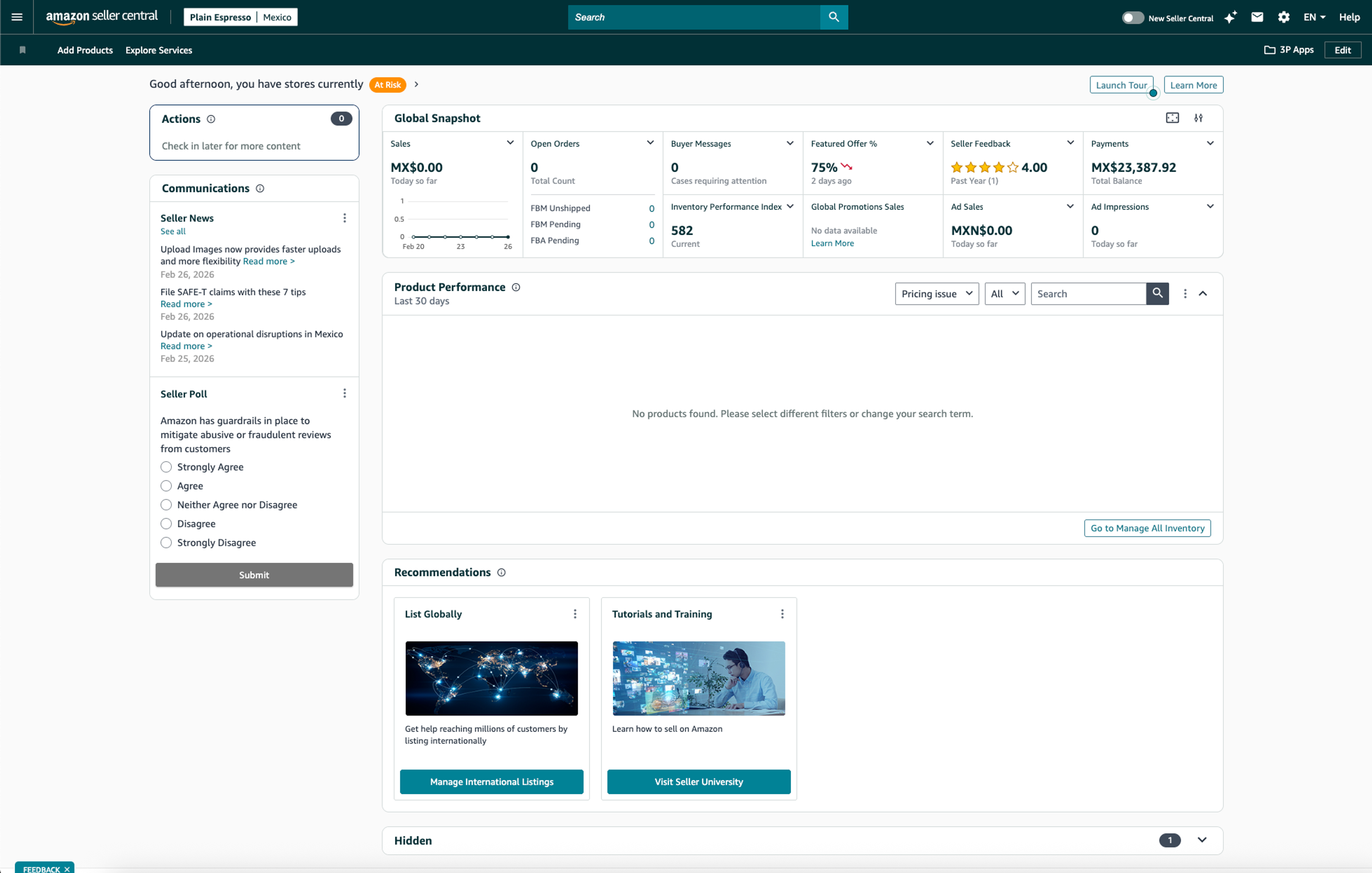
The Amazon Seller Central dashboard is the first thing you see when you log into your seller central account. It's designed to give you a quick sales snapshot directly on the homepage so you can assess your business health in seconds.
At the top, you'll find today's orders, units shipped, and sales revenue. The compare sales graph lets you compare today's sales against yesterday, last week, or last year. This visual trend line is the fastest way to spot problems or momentum.
Below the sales snapshot, the seller central homepage displays news, announcements, and alerts that need your attention. Policy changes, fee updates, and account health warnings all surface here. Real-time data on sales performance, conversion rates, and traffic can be customized with widgets for key KPIs in Dashboard Analytics. Ignore these alerts at your own risk.
Your Sales Snapshot and Daily Command Center
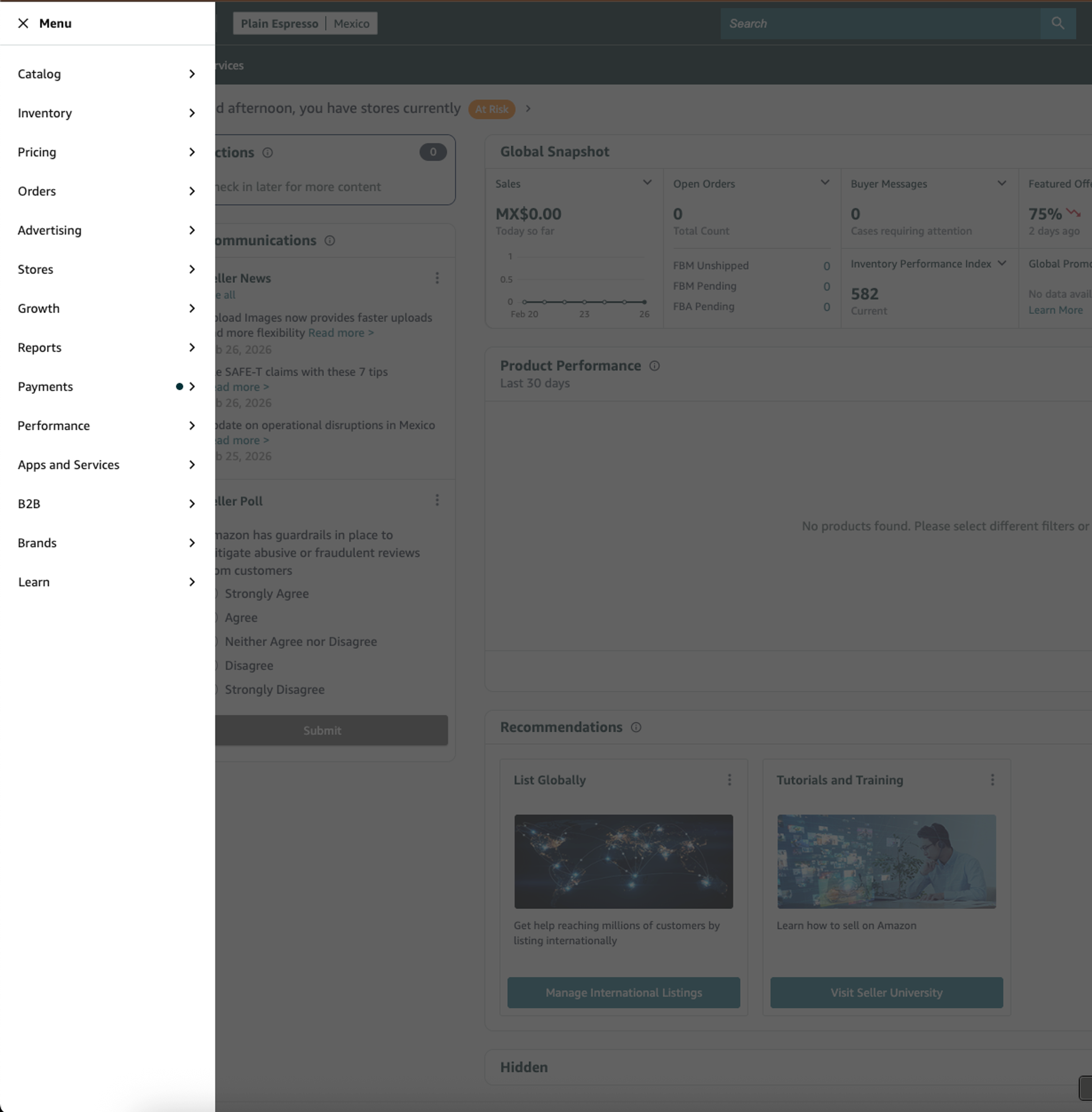
The main navigation bar in Seller Central allows quick access to Catalog, Inventory, Orders, Advertising, Reports, and Performance sections. The left navigation menu expands further into Pricing, Stores, Growth, Analytics, Shipments, Payments, Account Health, B2B, Brands, and Learn.
Each section branches into deeper tools. The sales dashboard gives you quick sales snapshot views, but the real power lives inside individual sections like Business Reports and Account Health. Learning this navigation structure saves you time every single day you're selling on Amazon.
The Amazon Seller Central dashboard is your daily command center. Treat it that way. Check it every morning the way you'd check your bank account. Sellers who log in regularly catch problems early. Sellers who don't end up reacting to fires instead of preventing them.
How to Set Up Your Seller Central Account
How to Start Selling on Amazon
Setting up your Amazon Seller Central account requires preparation. Before you start selling, gather these documents: business information (legal name, address), tax identification (SSN or EIN), bank account details for deposits, a credit card for verification, a phone number, and a government-issued ID. Identity verification for Amazon sellers also requires a recent bank or credit card statement as proof of address.
During the registration process, you will need to provide your email and password, and complete several key sections. Here's the registration process for your seller central account:
Step 1. Go to sell.amazon.com and click Sign Up.
Step 2. Choose your selling plan. Individual if you're testing the waters. Professional selling plan if you're serious.
Step 3. Provide your business information and account info. Amazon verifies everything.
Step 4. Complete identity verification. Amazon requires video verification for most new accounts, which can be done via a live video call or a face scan with your government-issued ID.
Step 5. Once approved, start selling by adding your first product listings.
The registration process for an Amazon Seller Central account typically takes 1-3 days, but may take longer if additional verification is needed. Having all documents ready before you begin prevents delays from incomplete applications.
Creating Your Amazon Seller Account and Selling Account
After registration, your Amazon selling account needs configuration. Enable two-factor authentication immediatelyon your Amazon seller account. This is non-negotiable security for your amazon seller central account.
Configure your account settings right away: return address, shipping templates, notification preferences, and display name. You can change your account information in Seller Central by going to Settings and then Account Info at any time. These details affect how customers see you and how efficiently you process orders.
Connect your bank account for payment disbursements. Amazon deposits your earnings every 14 days after deducting fees. Your bank account details must match your business information exactly, or payments will be delayed.
Pro tip: don't overthink your first listing. Start selling with an existing product (something already on Amazon) rather than creating a brand new listing. This lets you learn how your Amazon seller account and selling account features work without the complexity of product creation.
New Seller Tips and Incentives
Amazon offers New Seller Incentives in 2026 that many sellers miss entirely. These include $50 in coupon credits, free Vine enrollment for reviews, FBA storage credits, and a $200 amazon advertising credit. These seller incentives expire within 90 days of opening your amazon seller central account, so claim them immediately.
Common new seller mistakes include choosing the wrong selling plan (switching is easy but costs time), not enabling two-factor authentication, and ignoring the free advertising credit. The $200 ad spend alone can drive meaningful early sales for a new seller launching their first products on the Amazon marketplace.
If you're an experienced seller opening additional Amazon seller accounts, note that Amazon requires separate business entities for each seller central account. Running multiple seller accounts under one entity violates Amazon's terms and risks suspension.
Managing Your Inventory
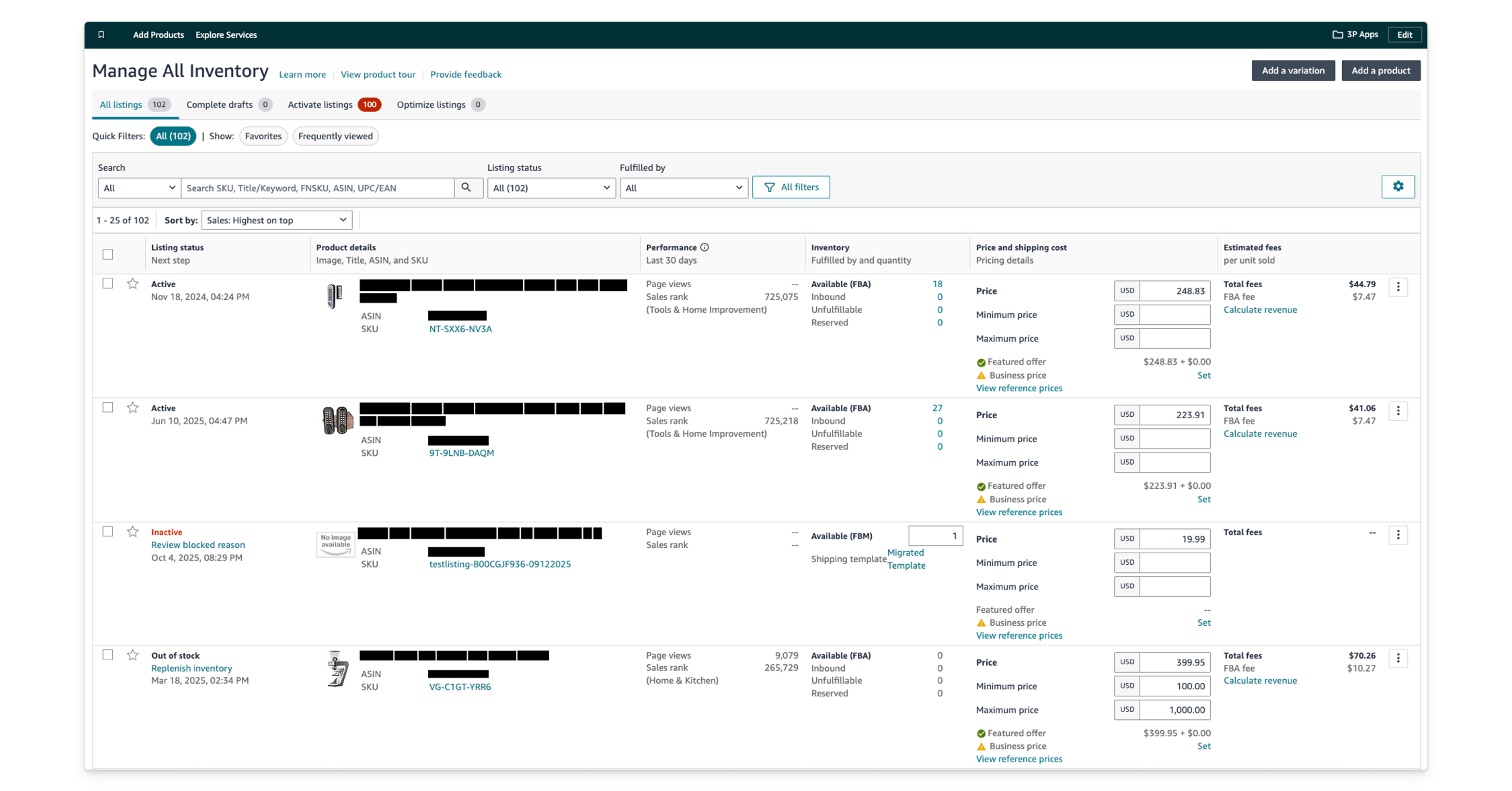
To manage inventory, sellers can use the Manage Inventory section to adjust stock levels and edit product details. This page is the daily workhorse of your amazon seller central account. Every SKU you sell appears here with columns for Status, SKU, ASIN, Available units, Price, and Fulfillment Channel. Use filters to sort by FBA vs FBM, active vs inactive, or stranded inventory.
You can manage FBA inventory by creating shipping plans, tracking inbound shipments, and monitoring stock levels. Sellers can monitor their inventory levels and make adjustments to avoid stockouts or overstock situations. FBM inventory management is simpler since you control your own warehouse, but you're responsible for inventory accuracy.
FBA means you ship products to Amazon's fulfillment centers. They store, pick, pack, and ship everything. Your products become Prime-eligible. The tradeoff is less control and more fees. FBM (Fulfillment by Merchant) means you handle everything from your own facility. More control over packaging and shipping, but no automatic Prime badge.
Every FBA unit needs a unique FNSKU barcode that ties it to your seller account. Without the right label, Amazon can commingle your inventory with other sellers' stock, leading to complaints about counterfeits you didn't send.
Sellers can track their inventory performance using the Inventory Performance Index (IPI) score available in Seller Central. Amazon calculates it based on excess inventory, sell-through rate, stranded inventory, and in-stock rate. A score below 400 triggers storage limits. Keep it above 450 for comfortable capacity. Third-party tools like InventoryLab can help streamline the listing workflow and manage inventory more efficiently alongside Seller Central's built-in tools.
Stranded inventory costs you money every day it sits unfulfillable. Check the Fix Stranded Inventory page weekly. Common causes: listing errors, pricing mistakes, or suppressed ASINs. Fix them fast.
Listing Products on Amazon
Two paths exist for selling products on Amazon. You can add your offer to an existing listing by searching for the product's ASIN or UPC, then setting your price and condition. Or you can create a new listing from scratch with your own title, description, images, and keywords.
Use bulk upload tools when adding many products at once. Seller Central provides inventory file templates you can fill out in a spreadsheet and upload in batches. This saves hours compared to adding products one at a time.
High-quality product listings require high-resolution images and relevant keywords in titles and bullet points. Front-load your title with the most important keywords and keep it under 200 characters. Write bullet points that lead with benefits, not features. Upload a minimum of 6 images with the main image on a pure white background and lifestyle shots showing the product in use. Optimizing product listings regularly involves updating titles with high-ranking keywords and ensuring compliance with Amazon's image standards.
Backend search terms give you 250 bytes of invisible keyword space. No need to repeat words already in your title. Use this space for alternate spellings, related terms, and common misspellings.
A+ Content is available to brand owners enrolled in Amazon Brand Registry. It replaces your basic description with enhanced images, comparison charts, and rich text modules. Products with A+ Content see higher conversion rates because they answer buyer questions visually. Every Amazon seller with brand registry should be using this feature. Tools like InventoryLab and Veeqo can help sellers manage listings and multi-channel shipping effectively alongside Seller Central.
Pricing and Repricing
The Pricing tab in Amazon Seller Central shows your pricing health, Buy Box eligibility, and competitive pricing data. Amazon flags products priced too high or too low compared to other sellers.
Amazon's built-in Automate Pricing tool lets you set rule-based repricing against the Buy Box price, lowest price from other sellers, or external references. It works for simple scenarios with stable competition. But it updates slowly, supports only basic rules, and has no profit-floor protection.
That's why dedicated repricers exist. Amazon's tool can't handle dynamic marketplaces where prices change multiple times per hour. Real-time repricing tools protect your margins, optimize for Buy Box rotation, and adjust strategy based on competition levels. Aura's repricing engine handles this kind of dynamic repricing automatically.
Pricing strategy fundamentals: don't race to the bottom. Factor in ALL fees before setting prices. Referral fees, FBA fulfillment fees, storage fees, prep costs, and advertising spend all eat into margins. Use Amazon's Revenue Calculator to estimate your true profit per item sold before committing to any product.
Orders and Fulfillment
Fulfillment by Amazon FBA vs Seller-Fulfilled
Choosing your fulfillment method shapes your entire business model. Fulfillment by Amazon FBA means Amazon stores your inventory, picks, packs, and ships customer orders, handles returns, and provides customer service. With FBA, products are automatically eligible for Prime shipping and receive a boost in the Buy Box algorithm. Seller-fulfilled (FBM) means you handle everything yourself, including warehousing and shipping.
There's also a third option: Seller Fulfilled Prime (SFP) allows sellers to fulfill orders from their own warehouse while still providing Prime shipping benefits to customers. SFP has strict performance requirements and limited availability, but it combines FBM control with Prime visibility.
Each fulfillment method has tradeoffs. FBA sellers pay higher fees but save time and win the Buy Box more often. FBM sellers keep more control but must maintain strict shipping performance metrics. Some sellers use both, putting fast-selling items in FBA and slow-movers in FBM.
How to Fulfill Customer Orders
When you fulfill customer orders through FBM, the workflow looks like this: confirm the shipment in Seller Central, print shipping labels, upload tracking information, and manage seller fulfilled orders through the Orders tab.
Late Shipment Rate must stay below 4%. Pre-Fulfillment Cancel Rate must stay below 2.5%. Miss these thresholds and your account health takes a hit.
Returns management lives in the Orders section. FBA returns are handled by Amazon. FBM returns come to you directly. Process them quickly. Slow return processing triggers complaints and affects customer satisfaction.
Multi-channel fulfillment (MCF) lets you use fulfillment by Amazon FBA to fulfill customer orders from your own website or other marketplaces like eBay or Shopify. It's underused but powerful for sellers with an online store beyond Amazon.
Platform errors can wipe out your Buy Box, zero out inventory counts, or merge listings without warning. Amazon glitches happen more often than you'd expect, and knowing how to respond quickly can save thousands in lost sales.
Amazon Partnered Carrier Program
The Amazon Partnered Carrier Program offers discounted shipping rates for inbound FBA shipments. When you create a shipping plan to send inventory to Amazon, you can choose Amazon's partnered carriers instead of booking your own.
The savings are significant. Amazon's negotiated rates with UPS and other carriers can be 50-70% cheaper than standard rates. You print shipping labels directly from Seller Central and the cost gets deducted from your seller account balance.
Use the Amazon Partnered Carrier Program for every FBA shipment unless you have a better rate locked in with your own carrier. Most sellers don't.
Amazon Advertising from Seller Central
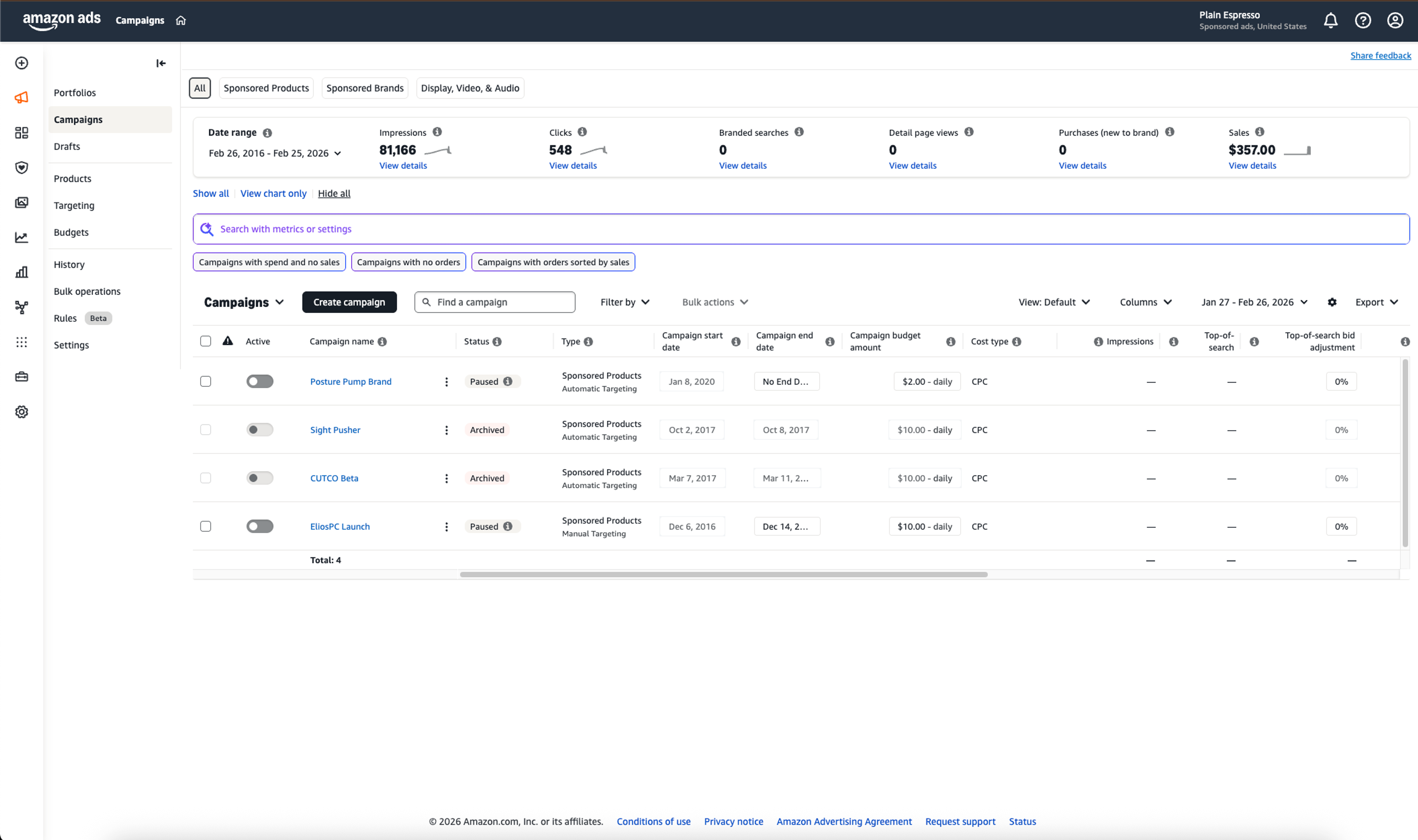
Amazon advertising lives inside Seller Central's Campaign Manager. Three main ad types are available to sellers, and understanding which to use is critical for growing sales.
Sponsored Products are keyword-targeted ads that appear in search results and on product pages. Every professional seller can create ad campaigns with Sponsored Products. They're the starting point for most advertising strategies.
Sponsored Brands place your brand logo and a selection of products at the top of search results. Sponsored Display retargets shoppers who viewed your products or similar ones. Both require Brand Registry.
To create ad campaigns effectively, start with automatic targeting. Amazon shows your ads based on keywords it thinks are relevant to your product. After 2-3 weeks of data, build manual campaigns using the winning search terms from your automatic campaigns.
Budget conservatively. Start with $10-20/day per campaign. Monitor ACoS (Advertising Cost of Sale) to ensure you're profitable. A good ACoS depends on your margins, but most sellers target 15-30% for Sponsored Products ad campaigns.
Your Amazon store (available through Brand Registry) gives you a branded storefront on the Amazon marketplace. Drive your ad campaigns traffic to your amazon store instead of individual listings to increase average order value.
If you're launching new products, the Amazon Vine program can jumpstart reviews and make your advertising spend more efficient. Getting those first 10-15 reviews changes your conversion rate overnight.
Reports and Analytics: The Data That Drives Decisions
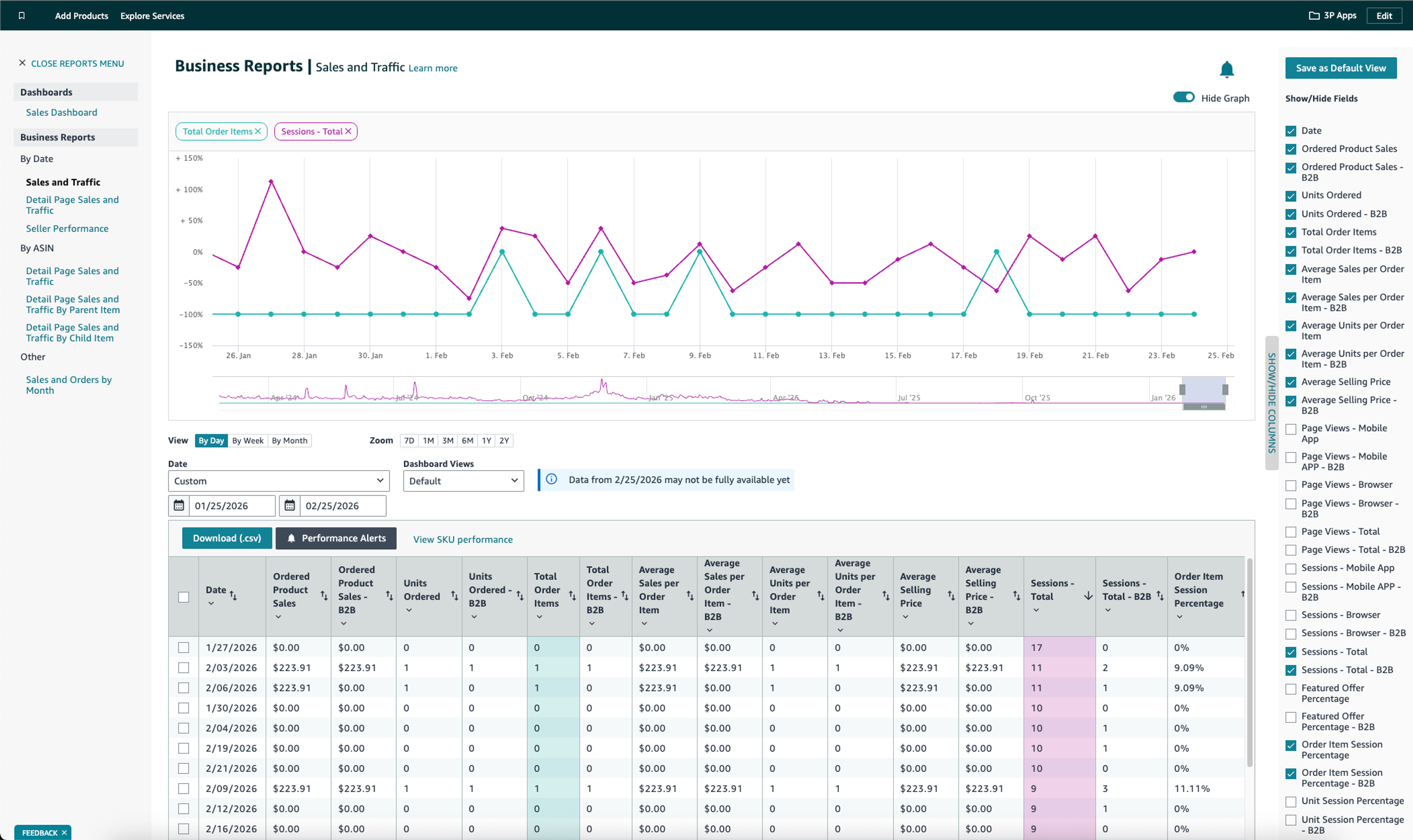
The business reports section inside Seller Central is where sellers go from guessing to knowing. Most sellers never open business reports. That's a mistake.
The Sales Dashboard shows sales revenue, units sold, and average selling price at a glance. But the real value is in Sales & Traffic by ASIN. This report shows sessions, page views, conversion rate, Buy Box percentage, and units ordered for every product you sell.
Here's how to read the sales statistics that matter:
Low sessions + high conversion = your listing converts well but nobody sees it. Fix visibility through advertising or SEO.
High sessions + low conversion = people find you but don't buy. Fix your listing (images, price, reviews, or bullet points).
Buy Box percentage below 90% = you're losing sales to other sellers on your own listing. Fix pricing or fulfillment method.
The business reports section also contains detailed reports for inventory, fulfillment, advertising, returns, and payments. Download Sales & Traffic by ASIN weekly and track trends over 30, 60, and 90 days. This is how you spot declining products before they become problems.
Advertising reports deserve special attention. The search term report shows exactly what customers typed before clicking your ad. Use this data to add winning keywords to your listings and negative match the duds.
Business reports are your competitive advantage. Sellers who analyze their sales statistics and business reports consistently outperform sellers who rely on gut feeling.
Account Health: Protecting Your Selling Privileges
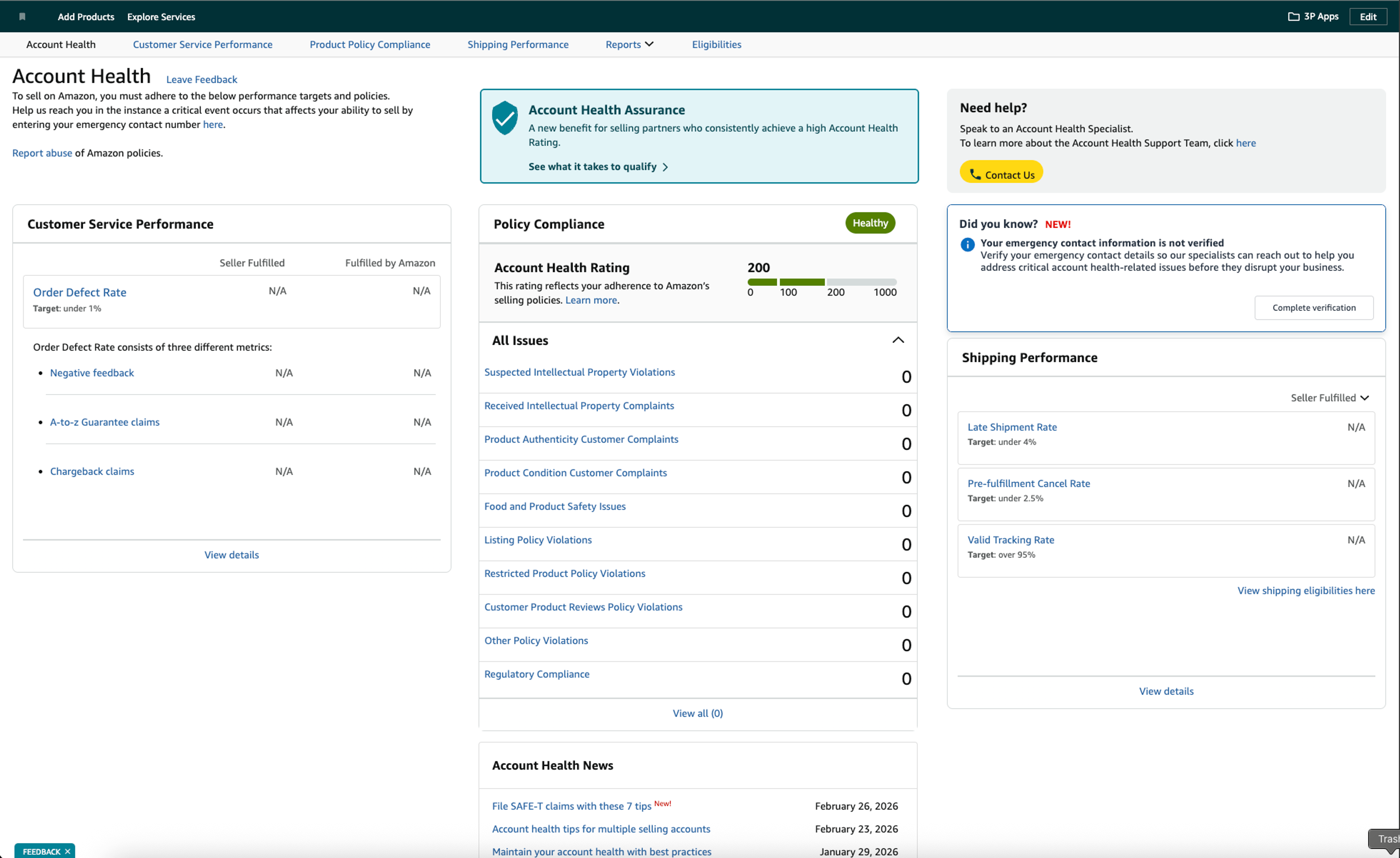
Amazon can suspend your seller central account without warning, freezing your inventory and revenue. The Account Health Dashboard monitors critical metrics such as Order Defect Rate, Late Shipment Rate, and Pre-Fulfillment Cancel Rate. Sellers must monitor their account health regularly to avoid potential suspensions due to policy violations or negative feedback.
Managing an Amazon Seller Central account requires constant monitoring of Account Health metrics, optimized product listings, and proactive inventory management. The Account Health dashboard provides insights into three categories:
Customer Service Performance tracks your Order Defect Rate (ODR). This must stay below 1%. ODR includes A-to-Z Guarantee claims, credit card chargebacks, and negative seller feedback. Providing good customer service and maintaining high customer satisfaction keeps this metric healthy.
Shipping Performance applies to FBM sellers who fulfill customer orders themselves. Late Shipment Rate must stay below 4%. Pre-Fulfillment Cancel Rate below 2.5%. Valid Tracking Rate above 95%. Miss any of these and your account health rating drops.
Policy Compliance covers intellectual property violations, product authenticity complaints, restricted product listings, and regulatory compliance. Maintaining account health involves proactively addressing compliance, intellectual property complaints, and customer feedback. One serious violation can outweigh months of good customer service performance.
Amazon's Account Health Rating (AHR) consolidates everything into a single score visible on your account health dashboard. Green is good. Yellow needs attention. Red means you're at risk of suspension.
If you get a warning: don't panic. Respond within 72 hours with a Plan of Action that addresses the root cause, describes corrective actions already taken, and outlines preventive measures. Be specific and factual. Amazon's review teams can tell when sellers copy generic templates.
Buyer-seller messaging directly impacts account health. Slow responses and miscommunication trigger complaints that raise your ODR. The Amazon Message Center is where all of this happens, and learning to navigate it quickly is worth the time.
Advanced Seller Central Tools Most Sellers Miss
Brand Registry and Tools for Brand Owners
Amazon Brand Registry unlocks the most powerful tools in Seller Central. After brand registry enrollment, brand owners get access to A+ Content, Sponsored Brands, Brand Analytics, Amazon Vine, and intellectual property protection tools.
Brand registry requires an active trademark registered with your country's trademark office. The enrollment process takes 2-4 weeks once your trademark is approved. Brand owners who skip brand registry leave significant revenue on the table.
Search Query Performance and Brand Analytics
Brand Analytics is the crown jewel for brand owners. The Search Query Performance dashboard shows exact search terms driving impressions and clicks to your listings. Top Search Terms reveals what customers in your category are searching for.
Market Basket Analysis shows what customers buy alongside your products. Use this to identify bundling opportunities or complementary products to add to your catalog. Repeat Purchase Behavior identifies your most loyal product lines so you know where to invest.
Manage Your Experiments (A/B Testing)
Amazon's Manage Your Experiments tool lets you A/B test titles, images, A+ Content, and bullet points on live listings. Amazon splits traffic between versions and tells you which one converts better with statistical significance.
Most sellers on the Amazon marketplace don't know this tool exists. It's a massive competitive advantage. Test one element at a time, run experiments for at least 4 weeks, and let the data decide.
Selling Across Multiple Amazon Marketplaces
Amazon's Unified Account lets you sell across multiple Amazon marketplaces from a single login. North America (US, Canada, Mexico), Europe (UK, Germany, France, Italy, Spain, others), and Asia-Pacific (Japan, Australia) are all accessible.
Each marketplace has its own inventory, pricing, tax requirements, and compliance rules. An experienced seller starts with one marketplace, masters operations, then expands. Don't try to launch everywhere simultaneously.
Selling across multiple Amazon marketplaces multiplies your addressable market. But it also multiplies your complexity. Start with markets where your product has clear demand and your logistics can support delivery.
Seller University and Free Training
Seller University is Amazon's free training library for sellers at every level. It covers account setup, listing optimization, FBA enrollment, advertising, brand registry, and policy compliance. The content is surprisingly useful for understanding platform changes and new features.
The seller forums provide community-driven Q&A where sellers and Amazon staff discuss problems, share strategies, and debate policy changes. Seller forums are particularly valuable for seller university graduates who need real-world advice beyond the official training.
User Permissions and Team Access
As your Amazon business grows, you'll need to grant user permissions to team members. Seller Central supports granular access levels so you can give your VA access to order management, your bookkeeper access to payments, and your PPC manager access to advertising, all without sharing your main login.
You can give access to your Amazon Seller Central account to a third person by adding them as a user in the User Permissions section. Each team member gets their own login with access limited to the tools they need. This protects your seller central account and creates an audit trail for every action taken.
Seller Central Fees: What Amazon Charges You
Understanding fees is critical for selling on Amazon profitably. The Individual Plan is free to register but charges $0.99 per item sold with no subscription fees, making it suitable for sellers with low sales volume. The Professional selling plan costs $39.99 monthly as a flat subscription fee regardless of volume and is suited for scaling businesses.
Referral fees apply to every item sold regardless of your selling plan. Most categories charge 15%, but rates range from 6% to 17% depending on the product category. High-value electronics pay less. Media products pay more.
FBA fees stack on top. Fulfillment fees cover picking, packing, and shipping each item. Storage fees charge monthly per cubic foot, with rates jumping during Q4 (October through December). Long-term storage fees hit inventory that sits for more than 365 days.
Check your fee breakdown in Payments → Transaction View. Click into any individual order to see exactly what Amazon charged. Most sellers discover they're losing money on 10-20% of their SKUs when they actually look at per-item profitability.
Amazon's Revenue Calculator estimates total fees before you commit to any product. Use it during product research, not after. Subscription fees, referral fees, and fulfillment fees add up fast.
FBA prep adds another layer of cost that catches new sellers off guard. FBA prep service fees vary widely depending on whether you DIY, use Amazon's prep service, or outsource to a third-party prep center.
Customer Communication and Seller Feedback
Buyer-Seller Messaging in Seller Central is where all customer inquiries land. Sellers should maintain a 24-hour response time to customer messages to protect their account health rating. Slow responses hurt your customer service performance metrics and can lead to A-to-Z claims.
Amazon's communication guidelines restrict what you can say. No external links, no requests to leave your amazon store, no incentives for reviews. Keep messages professional, helpful, and focused on resolving the customer's issue. Good customer service in messaging directly protects your account health.
Seller feedback is the public rating customers leave about their buying experience (separate from product reviews). You can respond publicly to seller feedback, and you can request removal of feedback that violates Amazon's policies, like product reviews left as seller feedback. You cannot incentivize or manipulate customer feedback in any way.
Utilizing the Voice of the Customer dashboard helps improve product quality by aggregating returns, refunds, and reviews. It shows which products generate the most complaints and why. The Request a Review button is Amazon's sanctioned method for asking buyers to leave reviews and seller feedback.
The Amazon Message Center has its own quirks worth learning separately. Knowing which messages require responses, which templates save time, and which phrases Amazon flags as violations can save you hours and protect your metrics.
Selling Used and Refurbished Products on Amazon
Seller Central supports selling products in multiple conditions: New, Like New, Very Good, Good, and Acceptable. Each condition grade has specific requirements for product quality and packaging.
When listing used items, add detailed condition notes describing any cosmetic imperfections, missing accessories, or packaging differences. Honest condition descriptions prevent returns and negative seller feedback. Condition settings live in the Manage Inventory section of your amazon seller central account. Each grade has specific rules about what qualifies, and getting them wrong leads to A-to-Z claims that tank your account health.
If you're sourcing inventory for resale, unclaimed and liquidation packages can be a viable channel. Many sellers use liquidation pallets as a low-cost way to stock used and refurbished inventory on Amazon.
Frequently Asked Questions
Is Amazon Seller Central Free?
Creating a seller central account is free. The Individual selling plan charges $0.99 per item sold. The Professional selling plan costs $39.99/month plus referral fees, FBA fees, and other costs. Most sellers on the Amazon marketplace choose the Professional plan for its fuller feature set.
What's the Difference Between Seller Central and Vendor Central?
On Seller Central, you sell directly to customers as a third party seller. On Vendor Central, you sell wholesale to Amazon and they resell to customers. Vendor Central is invite-only and typically used by large brands and manufacturers selling on Amazon at scale.
Can I Use Seller Central on My Phone?
Yes. The Amazon Seller app (iOS and Android) lets you monitor sales, manage customer orders, respond to buyer messages, and check account health from your phone. You can also scan product barcodes, adjust pricing, and view your sales snapshot on the go.
How Do I Contact Seller Support?
To contact seller support, click Help in the top right of Seller Central → Get Support → describe your issue → choose email or phone callback. There's no direct phone number. You must open a case first. Seller support response times vary, so include clear details in your initial request to avoid back-and-forth.
What Happens If My Account Gets Suspended?
You'll receive a notification explaining the violation. Submit a Plan of Action within 72 hours addressing the root cause, corrective actions taken, and preventive measures implemented. Appeals go through the Account Health team. Be specific, include evidence, and avoid emotional language.
Can I Sell on Multiple Amazon Marketplaces?
Yes. Amazon's Unified Account lets you sell across multiple Amazon marketplaces in North America, Europe, and Asia from a single seller central account. Each marketplace has its own inventory, pricing, and compliance requirements. Start with your strongest market and expand strategically.